
As we browse the internet, our online activities leave a trail of information that can be used to track us, invade our privacy, and compromise our security. This is why using your browser in stealth mode can be useful. In this article, we will explore how to use your browser in stealth mode and the benefits of doing so.
What is Stealth Mode?
Stealth mode, also known as private browsing, is a feature available in most web browsers that allows you to browse the web without leaving a trace of your activity. When you use your browser in stealth mode, your browsing history, cookies, and cache are not saved. Additionally, any data you enter into online forms, such as passwords or credit card information, is not saved. When you close the browser window, all traces of your activity are deleted, making it harder for anyone to track your online activities.
Benefits of Using Your Browser in Stealth Mode
Using your browser in stealth mode can offer several benefits. Here are a few examples:
- Increased Privacy: By using your browser in stealth mode, you can browse the internet without leaving a trace of your activity. This can help protect your privacy and keep your online activities confidential.
- Avoid Personalized Ads: When you browse the internet, websites track your online activities and use that information to show you personalized ads. By using your browser in stealth mode, you can prevent websites from tracking you and showing you personalized ads.
- Protect Against Identity Theft: When you enter personal information into online forms, such as your name, address, or credit card information, that information can be saved in your browser’s cache. If someone gains access to your computer, they could potentially steal this information. By using your browser in stealth mode, you can prevent this from happening.
How to Use Your Browser in Stealth Mode
Now that you understand the benefits of using your browser in stealth mode, let’s explore how to use it. The following steps will show you how to use your browser in stealth mode in some of the most popular web browsers.
Google Chrome
- Open Google Chrome.
- Click on the three dots in the top right-hand corner of the window.
- Select “New Incognito Window.”
- A new window will open, indicating that you are browsing in incognito mode.
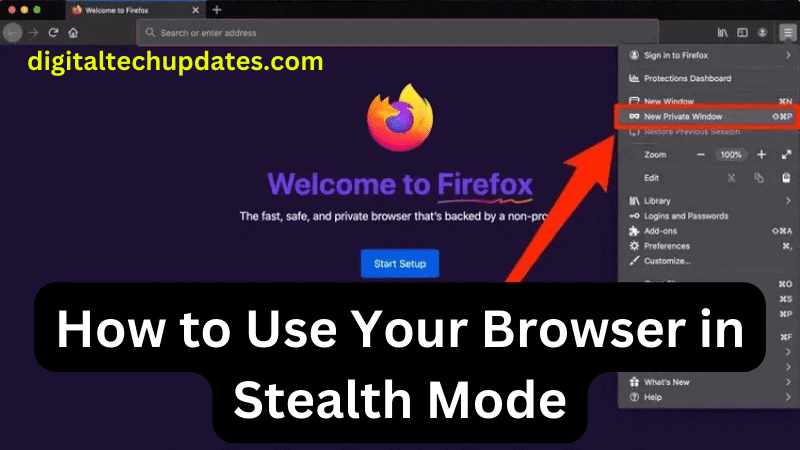
Mozilla Firefox
- Open Mozilla Firefox.
- Click on the three lines in the top right-hand corner of the window.
- Select “New Private Window.”
- A new window will open, indicating that you are browsing in private mode.
To create an additional level of security, it is recommended to use a proxy server in Firefox browser.
Apple Safari
- Open Apple Safari.
- Click on “File” in the menu bar.
- Select “New Private Window.”
- A new window will open, indicating that you are browsing in private mode.
Opera
Opera is another popular web browser that offers a stealth mode feature. To use this feature in Opera, follow these steps:
- Open Opera.
- Click on the “Menu” button in the top left-hand corner of the window.
- Select “New Private Window.”
- A new window will open, indicating that you are browsing in private mode.
In addition to preventing websites from tracking your online activities, Opera’s private mode also includes a built-in ad blocker, which can help prevent intrusive ads from appearing while you browse. Additionally, Opera’s private mode also blocks third-party cookies by default, further protecting your privacy online. Configuring Opera proxy server allows you to increase your surfing security by one more level. Overall, Opera’s private mode is a useful tool for anyone looking to protect their privacy while browsing the internet.
Microsoft Edge
- Open Microsoft Edge.
- Click on the three dots in the top right-hand corner of the window.
- Select “New InPrivate Window.”
- A new window will open, indicating that you are browsing in InPrivate mode.
Conclusion
Using your browser in stealth mode can be a useful tool to protect your privacy and prevent websites from tracking your online activities. By using this feature, you can browse the internet with confidence, knowing that your online activities are kept private. However, it is important to remember that using your browser in stealth mode does not make you completely anonymous online. To truly protect your privacy and security, it is important to use other tools such as VPNs, antivirus software, and firewalls.