
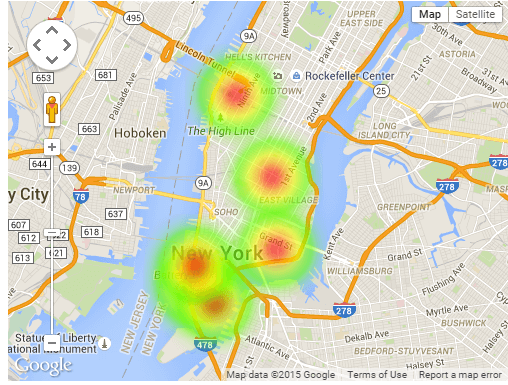
What is a Heatmap?
Wikipediadefines a heat map as a graphical representation of data where the individual values contained in a matrix are represented as colors. In WP Google Maps v6 the colors represent the density of “Markers” on the Map within an area drawn in the Map Editor. Since the radius of the heatmap area is fixed regardless of zoom level, it’s useful for showing a lot of things that gradually separate as you zoom in.
There are many other software that can help you increating a Google heat map – we strongly recommend to check it out and find the one that suits your needs.
Drawing a Heatmap
Open (or Create) the Map you want to use in the Map Editor (WordPress Dashboard → Maps).
Click theHeatmaptab to open the Google Heatmap Editor.

On the Heatmap Editor page, click theAdd a New Datasetbutton. If you have existing datasets, you can click theEditbutton.

- Give your dataset aName.
- You can choose between theDefault Gradientor aBlue Gradientfor your Heatmap by clicking the appropriate button. The chosen button will display a border for a few moments.
- You can adjust theOpacityof your Heatmap by entering any value between 0 and 1.0. These numbers represent a percentage between 0 and 100% (.1 is 10%, .2 is 20%, and so on).
- You can also modify theRadiusof your Heatmap by entering a new value in theRadiustextbox.
When you’ve added all your data Markers to the Map, click theSave Datasetbutton.

Map with Heatmap Displayed

Adding Marker Data without Drawing
If your data composes of geographic coordinates you can simply copy & paste that data into theHeatmap datatext box on the Heatmap Editor page. The data must be a series of comma-separated values, for example: (31.038329543616193, -83.63107960671186),(31.03832947179815, -83.63107960671186),(31.545288367366297, -83.01035206764936)

Don’t forget to click theSave Datasetbutton to save your data.
This article coversusing heatmaps WP Google Maps. This article is based on WP Google Maps v6. WP Google Maps v7 (currently in development) makes significant changes to this feature. If you need further assistance or are having other issues with the plugins, feel free to visit our Support Desk.