Testing CORS Policies in an API: Find the Origin Reflection Bug With Nothing but curl

Introduction
Cross-Origin Resource Sharing (CORS) is an important part of web security. It controls when a browser allows JavaScript running on one website to read responses from another website. However, a small configuration mistake can allow an API to grant access to origins that should not be trusted.
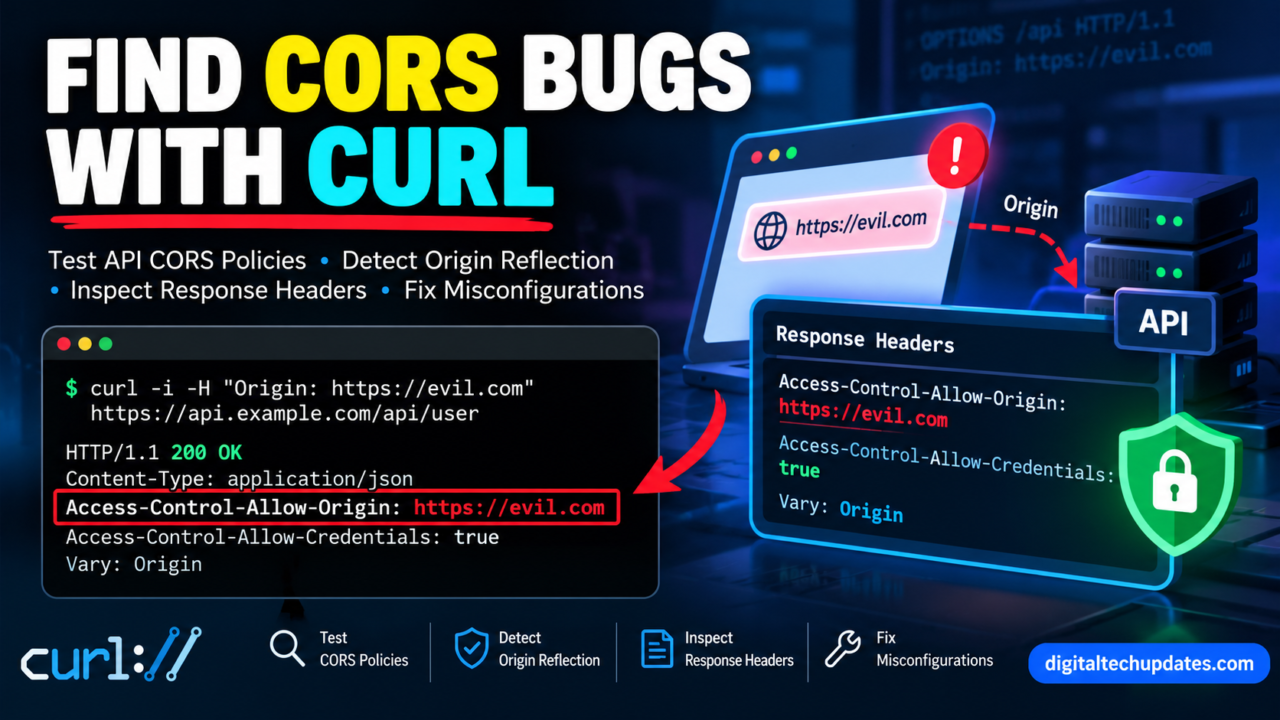
One common mistake is called a CORS origin reflection vulnerability. It occurs when an API takes the Origin header from an incoming request and returns the same value in its Access-Control-Allow-Origin response header without properly validating it.
The good news is that you do not need expensive security tools to perform an initial CORS check. With nothing but curl, you can send controlled HTTP requests, inspect response headers, and identify suspicious CORS configurations.
In this guide, you will learn how CORS works, how to test an API using curl, how to identify potential origin reflection bugs, and how to fix unsafe configurations.
These examples are intended for APIs you own or have explicit permission to test.
What Is CORS?
CORS stands for Cross-Origin Resource Sharing. It is a browser security mechanism that determines whether JavaScript running on one origin can access a response from another origin.
An origin consists of three components:
- Scheme, such as
https - Hostname, such as
app.example.com - Port, such as
443
For example, https://app.example.com and https://api.example.com are different origins, even though they share the same parent domain.
Suppose a frontend application hosted at https://app.example.com needs to retrieve information from https://api.example.com. The browser checks the API’s CORS response headers to determine whether the frontend is allowed to read the response.
A typical response might contain:
Access-Control-Allow-Origin: https://app.example.com
Vary: Origin
The Access-Control-Allow-Origin header identifies the permitted origin. The Vary: Origin header tells compatible caches that the response may vary depending on the request’s Origin header.
CORS does not replace authentication or authorisation. It primarily controls browser-based cross-origin access and does not prevent direct HTTP requests made using curl.
For more information, consult the MDN CORS Guide.
What Is a CORS Origin Reflection Bug?
A CORS origin reflection bug occurs when an API accepts an incoming Origin header and reflects it into the Access-Control-Allow-Origin response header without applying proper validation.
Consider this request:
GET /api/profile HTTP/1.1
Host: api.example.test
Origin: https://untrusted.example
A suspicious response might look like this:
HTTP/1.1 200 OK
Access-Control-Allow-Origin: https://untrusted.example
Access-Control-Allow-Credentials: true
Content-Type: application/json
This response deserves investigation because the API appears to permit a caller-supplied origin.
If the endpoint contains sensitive user information and the browser is allowed to send credentials and read the response, the configuration may expose private data to an untrusted website.
However, reflection alone does not prove that the issue is exploitable. You must also consider the endpoint’s sensitivity, authentication requirements, browser behaviour, and intended CORS policy.
How to Test API CORS Policies With curl
Curl is a command-line tool that sends HTTP requests and displays server responses. It is available on Linux, macOS, Windows, and many development environments.
The following examples use https://api.example.test as a placeholder. Replace it with an API endpoint you are authorised to test.
Step 1: Send a Normal Request
Start by checking the API’s normal response headers.
curl -sS -D - -o /dev/null \
  "https://api.example.test/api/profile"
This command displays the HTTP response headers while discarding the response body.
Look for the HTTP status and any CORS-related headers.
For example:
HTTP/2 200
Content-Type: application/json
Access-Control-Allow-Origin: https://app.example.test
Vary: Origin
Your actual response may differ. An endpoint may return 401 Unauthorized or 403 Forbidden when authentication or permissions are required.
These responses do not automatically indicate a CORS problem.
Step 2: Test With a Trusted Origin
Suppose the approved frontend is https://app.example.test.
Send a request with that origin:
curl -sS -D - -o /dev/null \
  -H "Origin: https://app.example.test" \
  "https://api.example.test/api/profile"
If the endpoint is intended to support that frontend, you may see:
Access-Control-Allow-Origin: https://app.example.test
Vary: Origin
This gives you a baseline for comparison with requests from unapproved origins.
Step 3: Test With an Untrusted Origin
Now send the same request using an origin that is not included in the application’s approved allowlist.
curl -sS -D - -o /dev/null \
  -H "Origin: https://untrusted.example" \
  "https://api.example.test/api/profile"
Check the Access-Control-Allow-Origin response header.
There are two important possibilities.
Expected behaviour for a restricted API: The server omits the header or does not grant permission to the untrusted origin.
Potential origin reflection: The server returns:
Access-Control-Allow-Origin: https://untrusted.exampleIf the application is supposed to allow only specific origins, this behaviour warrants further investigation.
A public API may intentionally allow all origins, so always compare the result with the application’s intended security policy.
Step 4: Filter the Relevant Response Headers
You can use grep to display the most important headers:
curl -sS -D - -o /dev/null \
  -H "Origin: https://untrusted.example" \
  "https://api.example.test/api/profile" |
  grep -iE '^(HTTP/|access-control-allow-origin:|access-control-allow-credentials:|vary:)'
This makes it easier to compare responses without reading every header.
Pay particular attention to these fields:
Access-Control-Allow-OriginAccess-Control-Allow-CredentialsVary- HTTP status code
If the server reflects an unapproved origin, investigate the origin validation logic and determine whether sensitive data could be exposed through a browser.
Four Additional CORS Tests Worth Performing
Origin reflection is not the only CORS configuration problem. The following tests can help you assess your own API more thoroughly.
Test 1: Check the Null Origin
Some browser contexts serialise their origin as null, including certain sandboxed documents.
Test the response using:
curl -sS -D - -o /dev/null \
  -H "Origin: null" \
  "https://api.example.test/api/profile"
Check whether the response contains:
Access-Control-Allow-Origin: nullIf it does, investigate whether this behaviour is intentional. Allowing the null origin can be unsafe because potentially hostile documents can also have that origin.
Test 2: Check for a Wildcard Origin
Inspect whether the API returns:
Access-Control-Allow-Origin: *A wildcard permits browser scripts from any origin to read otherwise accessible responses, subject to browser security rules.
This can be appropriate for public, non-sensitive APIs. It is more concerning when an endpoint contains private information or relies on browser credentials.
Browsers do not allow credentialed CORS responses to use Access-Control-Allow-Origin: *.
Therefore, a wildcard alone does not prove that private, authenticated data can be read by an attacker.
Test 3: Inspect the Preflight Response
Browsers send preflight requests before certain cross-origin requests, particularly when the intended method or request headers require permission.
You can simulate a preflight request using curl:
curl -sS -D - -o /dev/null \
  -X OPTIONS \
  -H "Origin: https://untrusted.example" \
  -H "Access-Control-Request-Method: PUT" \
  -H "Access-Control-Request-Headers: authorization,content-type" \
  "https://api.example.test/api/profile"
Inspect the following response headers:
Access-Control-Allow-Origin: https://app.example.test
Access-Control-Allow-Methods: GET, POST
Access-Control-Allow-Headers: Content-Type
These are illustrative values, not a required response for every API.
Check whether the server grants only the origins, methods, and headers that the application actually needs.
A simulated preflight is not a complete browser test. The browser applies its own CORS rules when deciding whether to send the actual request and expose the response to JavaScript.
Test 4: Check Subdomain Validation
Applications sometimes allow several trusted subdomains, such as a main frontend and an administration portal.
Problems can occur when a server trusts any hostname containing a familiar domain name rather than validating the origin correctly.
For example, a loose string-matching rule may accidentally trust an unrelated hostname that merely contains the expected text.
When reviewing your own application, inspect the origin validation code or configuration. Confirm that it checks the scheme, hostname, and port as intended.
Use an explicit allowlist of trusted origins or carefully validated rules for subdomains that your organisation controls.
A Simple CORS Testing Checklist
Use this table to record your findings for each endpoint.
| Test case | Expected result for a restricted API | What to investigate |
|---|---|---|
| Approved origin | Explicitly permitted origin | Does the intended frontend work? |
| Untrusted origin | No permission granted | Is the origin reflected? |
| Null origin | Not allowed unless justified | Is an unsafe null origin permitted? |
| Wildcard origin | Used only where appropriate | Could sensitive information be exposed? |
| Preflight request | Only intended methods and headers permitted | Are unnecessary permissions granted? |
| Subdomain variation | Only approved subdomains permitted | Is origin matching too broad? |
Record the endpoint, timestamp, request origin, HTTP status, relevant response headers, and expected policy.
This makes your results easier to reproduce and helps developers investigate configuration issues.
How to Fix a CORS Origin Reflection Vulnerability
Once you identify an unsafe configuration, focus on correcting the server’s origin validation logic.
1. Use an Explicit Origin Allowlist
For example, an application might allow:
https://app.example.test
https://admin.example.test
The server should compare the incoming origin against the approved set. If the origin is not allowed, it should not grant that origin cross-origin access.
Avoid trusting an origin simply because its hostname contains your company domain.
2. Handle Credentials Carefully
If your application needs credentialed browser requests, return an explicit approved origin and configure Access-Control-Allow-Credentials: true only where necessary.
Do not combine unrestricted origin reflection with credentialed access.
Remember that CORS does not replace authentication or authorisation. The API must independently verify that users are permitted to access the requested resources.
3. Configure Caching Correctly
When the server returns different CORS responses depending on the incoming Origin header, use an appropriate:
Vary: OriginThis helps compatible caches distinguish responses associated with different origins.
Review your CDN and reverse-proxy caching rules as well. Incorrect cache behaviour can cause responses to be reused in unintended contexts.
4. Retest After Deployment
Repeat the trusted-origin and untrusted-origin tests after applying the fix.
Confirm that approved frontends continue to work and that unapproved origins no longer receive permission.
Where sensitive information is involved, also test the application’s authentication and authorisation controls in an appropriate test environment.
For further guidance, read the OWASP REST Security Cheat Sheet and the OWASP Web Security Testing Guide.
Common Mistakes When Testing CORS With curl
Mistake 1: Assuming HTTP 200 Proves a Vulnerability
An HTTP 200 response only indicates that the server returned a successful response. CORS determines whether a browser permits JavaScript to read that response.
These are separate checks.
Mistake 2: Assuming curl Enforces Browser CORS Rules
Curl does not enforce browser CORS restrictions. It lets you inspect the server’s HTTP response, including the CORS headers.
A request may succeed in curl even though a browser would prevent JavaScript from reading the response.
Mistake 3: Treating Every Wildcard as a Vulnerability
A wildcard can be appropriate for a public API that intentionally serves non-sensitive information. The security impact depends on the endpoint, data, authentication model, and intended access policy.
Mistake 4: Ignoring Authentication Requirements
Origin reflection on a public endpoint may have limited impact. The same mistake on an endpoint containing private account information may be more serious if a browser can send credentials and read the response.
Mistake 5: Testing Only One Origin
A single request may not reveal the complete policy. Compare trusted and untrusted origins, inspect relevant preflight behaviour, and review the server’s validation logic.
Frequently Asked Questions
1. Can I test CORS without Burp Suite?
Yes. Curl is sufficient for basic HTTP-level CORS testing. You can send an Origin header, simulate an OPTIONS preflight request, and inspect the response headers. Browser testing is useful when you need to confirm actual browser behaviour.
2. Which header is most important when finding origin reflection?
The main header is Access-Control-Allow-Origin. Compare its value with the Origin header you sent. If an unapproved origin is returned as an allowed origin, investigate whether the server is reflecting untrusted input.
3. Is origin reflection always a security vulnerability?
No. Reflection is a warning sign, but its impact depends on the API’s intended policy, the sensitivity of its responses, credential handling, and other access controls. An authorised assessment should establish whether an untrusted browser origin can read information it should not access.
4. What does Access-Control-Allow-Credentials: true mean?
It indicates that the server permits a qualifying credentialed cross-origin response to be exposed to browser JavaScript when the other CORS requirements are met. Credentialed responses must specify an explicit allowed origin rather than using a wildcard.
5. Why does curl show a response when a browser reports a CORS error?
Curl is an HTTP client, not a browser security engine. Browsers apply CORS rules before making cross-origin responses available to page scripts. Therefore, an HTTP request can succeed while the browser prevents JavaScript from reading the result.
6. How do I fix an API that reflects every origin?
Replace arbitrary reflection with explicit origin validation. Permit only the origins your application needs, configure credentials carefully, review caching behaviour, and retest the change against approved and unapproved origins.
7. Can CORS misconfiguration expose API keys or user data?
Potentially, depending on the application’s design. If an API returns sensitive information and a browser is allowed to send credentials and read that response from an untrusted origin, the impact may be serious. CORS does not replace server-side authorisation or protect secrets embedded in public frontend code.
Conclusion: Find CORS Origin Reflection With Nothing but curl
Testing CORS policies does not have to begin with complicated security tools. Curl provides a straightforward way to inspect API response headers and identify suspicious origin-handling behaviour.
Start with an approved origin, compare it against an untrusted origin, and inspect the Access-Control-Allow-Origin header. Then examine null origins, wildcard policies, preflight responses, and subdomain validation where relevant.
Most importantly, distinguish a suspicious header from a confirmed vulnerability. Check the intended policy, endpoint sensitivity, authentication requirements, and browser behaviour before reporting a security issue.
A properly configured API should grant cross-origin access only as broadly as its legitimate requirements demand.
With a few repeatable curl commands and a clear test matrix, developers can identify configuration mistakes early and improve API security without relying exclusively on specialised scanners.

Thalla Lokesh
Thalla Lokesh is a Digital Marketing Strategist and SEO Specialist with over 12 years of experience in helping businesses grow their online presence. Since beginning his career in 2013, he has successfully worked across industries including healthcare, education, technology, and e-commerce. He specializes in search engine optimization (SEO), content marketing, keyword strategy, and link building, with a strong focus on delivering measurable results. Lokesh has helped brands achieve top rankings on Google through data-driven strategies, high-quality content, and ethical SEO practices aligned with search engine guidelines. As the founder of Honey Web Solutions , a Tirupati-based digital marketing company, he actively works with clients to improve organic traffic, lead generation, and online visibility. He also contributes expert insights on digital marketing trends, AI SEO, and content strategies through blogs and industry platforms.